The Dell Precision 7520 has performed well so far with the Quadro M1200 and smaller models. But I wanted a little more. 4GB is a bit on the low side, and while the speed is fine for casual use, it’s not enough for anything more demanding.
Years ago, I built a PC, and since I enjoyed playing Elite Dangerous back then, I treated myself to a GTX 970. Yes, I know the GTX 970 also only has 4GB of VRAM, but it has a higher bandwidth, which benefits performance.
So I wanted to see how this card performs and whether it’s worth investing in a card with more RAM.
Since eGPU-to-Thunderbolt adapters are insanely expensive, I decided to go the DIY route with an eGPU-to-Oculink-to-M.2 adapter.
So I ordered the “EXP GDC OCuLink High Speed GPU Dock PCIe 4.0 ×4 Mini PC Notebook Laptop to External Graphics Card Adapter M.2 Mkey to OCuLink.”
First off, it’s not plug-and-play! But it was worth it.
How to get it running
After installing it, it did not run.
lspci -tvDid not show an additional tree with the GTX 970, so the handshake was not successful with the M.2 adapter.
After reading some articles about the problem, I decided to bridge some pins so the ATX power supply can start by itself. The reason is that the order of starting the devices does matter. The adapter can manage the on/off procedure together with the Dell, but still it does not work. The EXP adapter has a switch, but unfortunately you have to open it to use it, which I did. I turned it on, but then the setup was not usable at all. I don’t know if it was because I moved the setup around or not. Furthermore, I measured the pins, and the switch seemed to do the right thing, but to prevent having more sources of problems, I disabled it and bridged it again the old way.
Starting the EXP with the GTX 970 did the trick, and it worked. Until it doesn’t. After reinstalling all the cables and the M.2. Adapter, it worked again. During analysis I found a lot of AER messages and communication errors between the computer and the graphics card. Some disappeared after I disabled ASPM, which stands for Active-State Power Management. To disable it, I added:
GRUB_CMDLINE_LINUX="consoleblank=30 pcie_aspm=off pci=realloc"to my GRUB configuration. In my case,
/etc/default/grubthen
sudo update-gruband restart.
This helped to get rid of the AER messages, but still the communication errors are existing, and the setup is brittle as hell. It means if it doesn’t run, check the cables. From my experience with the setup, the cables are very error-prone. I, meanwhile, ordered a new cable, which will hopefully be better.
How lspci should look like:
-[0000:00]-+-00.0  Intel Corporation Xeon E3-1200 v5/E3-1500 v5/6th Gen Core Processor Host Bridge/DRAM Registers
           +-01.0-[01]--+-00.0  NVIDIA Corporation GM107GLM [Quadro M1200 Mobile]
           |            \-00.1  NVIDIA Corporation GM107 High Definition Audio Controller [GeForce 940MX]
           +-02.0  Intel Corporation HD Graphics 530
           +-04.0  Intel Corporation Xeon E3-1200 v5/E3-1500 v5/6th Gen Core Processor Thermal Subsystem
           +-14.0  Intel Corporation 100 Series/C230 Series Chipset Family USB 3.0 xHCI Controller
           +-14.2  Intel Corporation 100 Series/C230 Series Chipset Family Thermal Subsystem
           +-15.0  Intel Corporation 100 Series/C230 Series Chipset Family Serial IO I2C Controller #0
           +-15.1  Intel Corporation 100 Series/C230 Series Chipset Family Serial IO I2C Controller #1
           +-16.0  Intel Corporation 100 Series/C230 Series Chipset Family MEI Controller #1
           +-17.0  Intel Corporation Q170/Q150/B150/H170/H110/Z170/CM236 Chipset SATA Controller [AHCI Mode]
           +-1c.0-[02]----00.0  Intel Corporation Wireless 8265 / 8275
           +-1c.2-[03]----00.0  Realtek Semiconductor Co., Ltd. RTS525A PCI Express Card Reader
           +-1c.4-[04-3c]--
           +-1d.0-[3d]--+-00.0  NVIDIA Corporation GM204 [GeForce GTX 970]
           |            \-00.1  NVIDIA Corporation GM204 High Definition Audio Controller
           +-1f.0  Intel Corporation CM238 Chipset LPC/eSPI Controller
           +-1f.2  Intel Corporation 100 Series/C230 Series Chipset Family Power Management Controller
           +-1f.4  Intel Corporation 100 Series/C230 Series Chipset Family SMBus
           \-1f.6  Intel Corporation Ethernet Connection (5) I219-LM
Running M1200 and GTX in parallel
nvidia-smi+-----------------------------------------------------------------------------------------+
| NVIDIA-SMI 580.126.09 Driver Version: 580.126.09 CUDA Version: 13.0 |
+-----------------------------------------+------------------------+----------------------+
| GPU Name Persistence-M | Bus-Id Disp.A | Volatile Uncorr. ECC |
| Fan Temp Perf Pwr:Usage/Cap | Memory-Usage | GPU-Util Compute M. |
| | | MIG M. |
|=========================================+========================+======================|
| 0 Quadro M1200 On | 00000000:01:00.0 Off | N/A |
| N/A 35C P8 N/A / 200W | 2399MiB / 4096MiB | 0% Default |
| | | N/A |
+-----------------------------------------+------------------------+----------------------+
| 1 NVIDIA GeForce GTX 970 On | 00000000:3D:00.0 Off | N/A |
| 0% 37C P8 12W / 163W | 1319MiB / 4096MiB | 0% Default |
| | | N/A |
+-----------------------------------------+------------------------+----------------------+
+-----------------------------------------------------------------------------------------+
| Processes: |
| GPU GI CI PID Type Process name GPU Memory |
| ID ID Usage |
|=========================================================================================|
| 0 N/A N/A 997 C ...ma.cpp/build/bin/llama-server 2393MiB |
| 1 N/A N/A 996 C ...ma.cpp/build/bin/llama-server 1314MiB |
+-----------------------------------------------------------------------------------------+Pictures of the setup
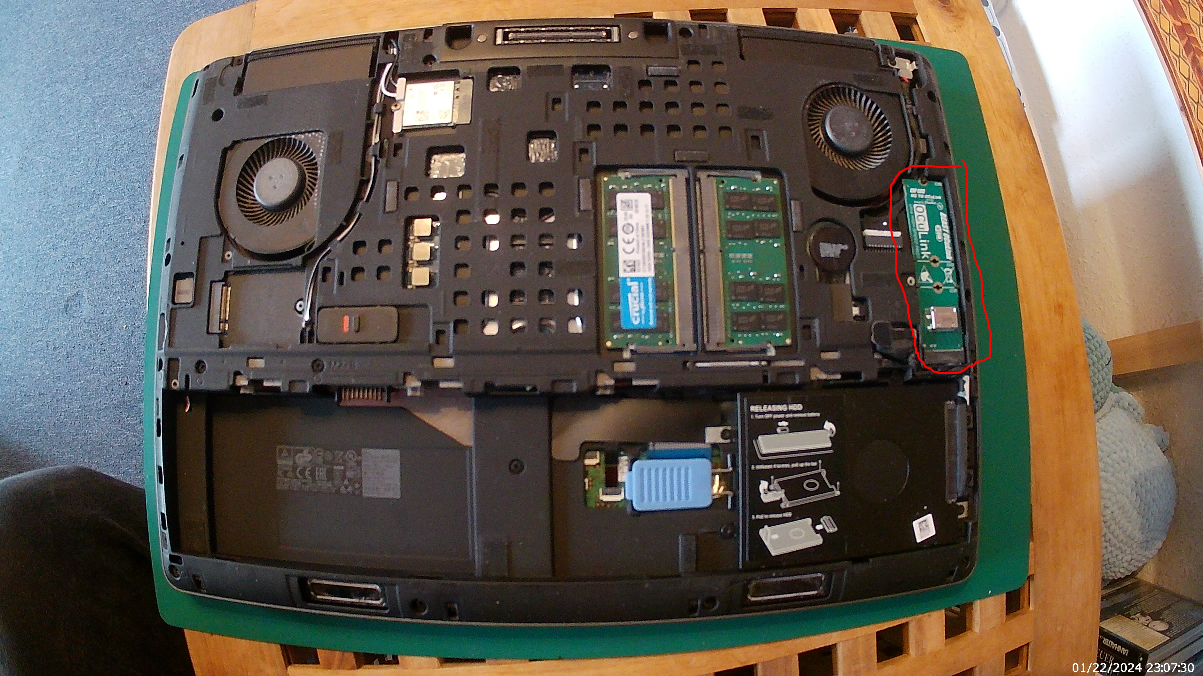
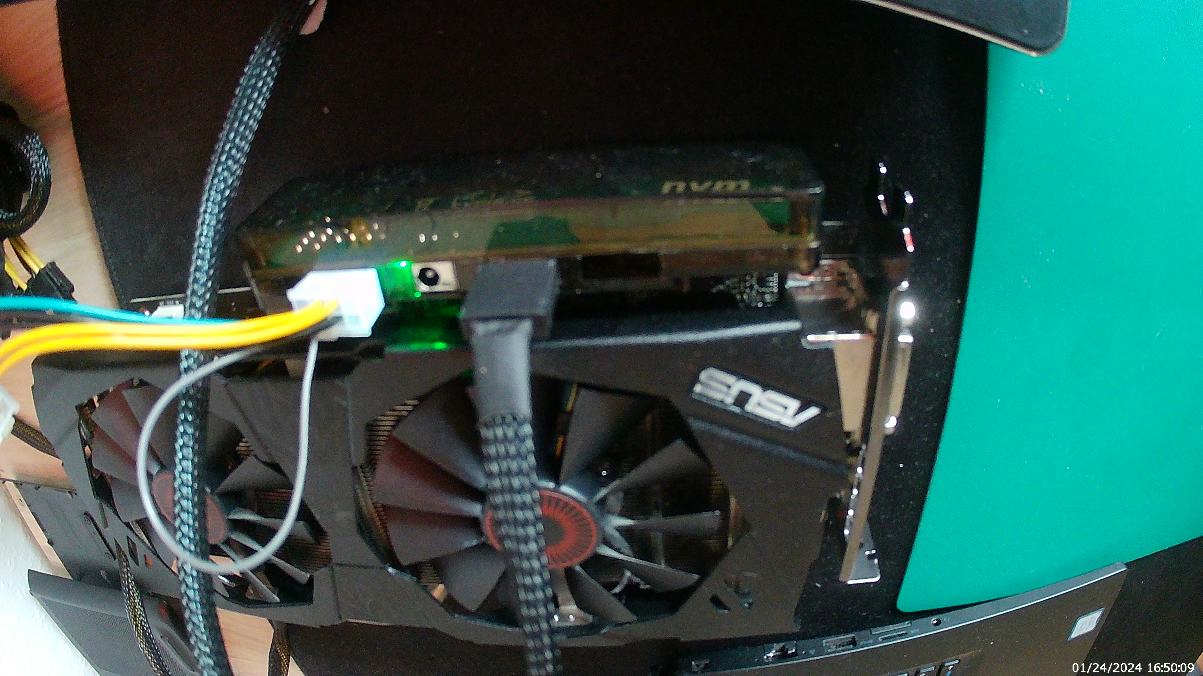
Note
Don’t be surprised if the fans aren’t running. They are dependent on the temperature, and surprisingly, AI doesn’t produce heat on this card.
For that setup I use independent llama-server instances. To assign them to a specific card, the service must get an environment variable:
Environment="CUDA_VISIBLE_DEVICES=1" It doesn’t match the ID visible in nvidia-smi so you have to try it out. This example routes to the M1200 even though the GTX 970 has the ID 1.
Is it worth it?
Totally, yes. I have overall an increase of about factor 3. It’s not super fast but way more than I expected. I use the factor here because the speed hardly depends on the settings, context windows, and the size of the model. However, old GTX cards are very cheap, and even though this is not a hassle-free setup, you can get some good results with about €100 investment. And now I try to get the cables more robust so that I can try another card with more VRAM.